The workspace
The screen you will actually live in
No dashboards to configure and no reports to assemble. One screen, one decision at a time.
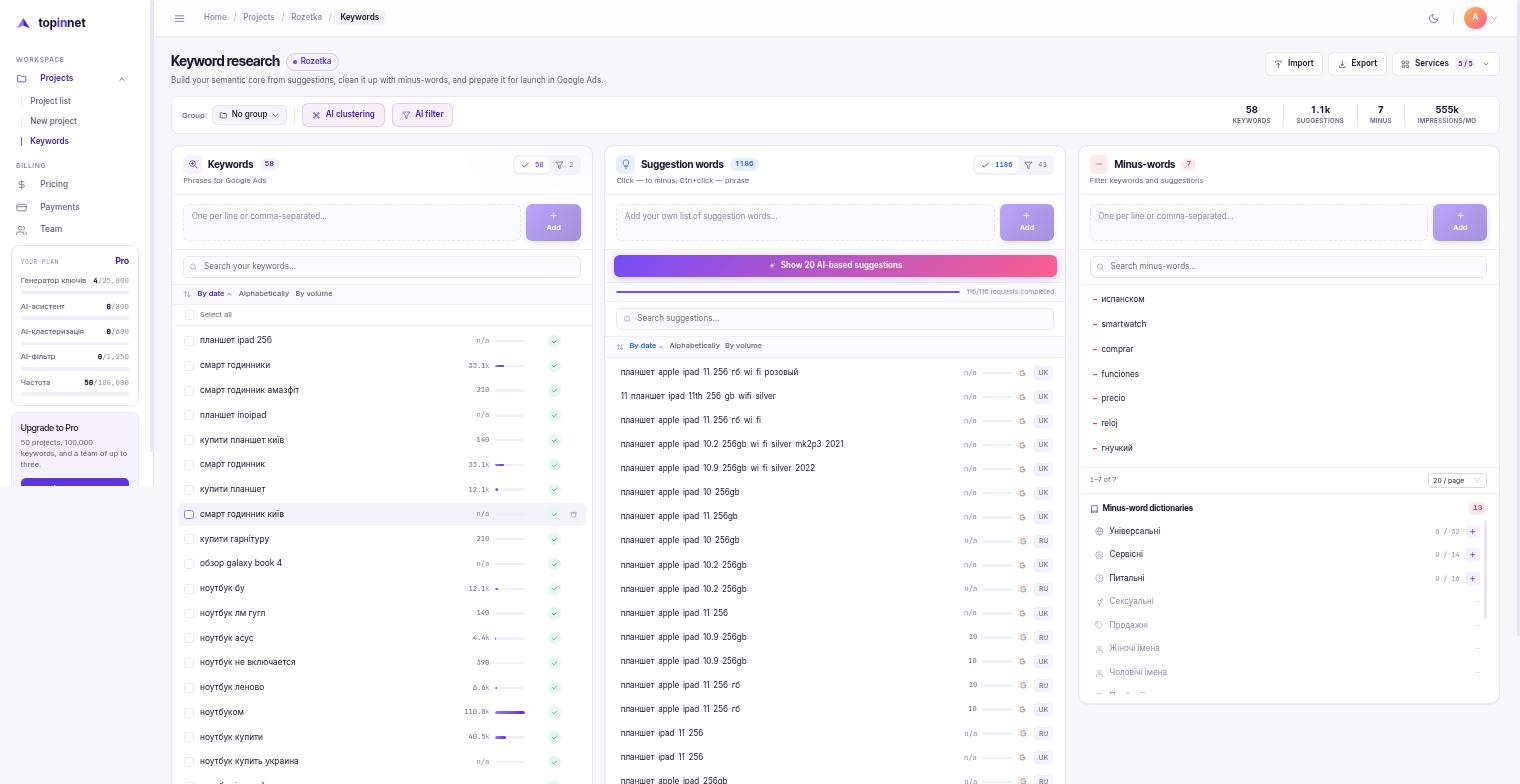
We surface the queries your campaigns are missing, cut junk impressions with negative keywords, and hand you a grouped Excel. Mark a negative once — it never shows up in your list again.
30 days free · no card
Your reach widens with queries you are not bidding on and not writing for yet.
Negative keywords cut paid clicks and impressions from people who will never buy.
Sorting and clustering run with an AI assistant, or entirely by hand if you prefer.
Google Ads charges on every match, including the ones you never had in mind. Put your own numbers in — we do not know your share, so nothing here is our claim.
Nothing to install and nothing to configure. The order below is the order you will actually work in.
One project per campaign, site section, or client. Groups inside it inherit the negatives of the parent.
The keyword generator pulls search suggestions, the AI assistant proposes ideas, or you import your own list.
One click turns a word into a negative and clears every query that contains it. AI groups whatever is left.
Excel split by groups, plus a negatives sheet ready to paste straight into Google Ads.
No dashboards to configure and no reports to assemble. One screen, one decision at a time.
Live search suggestions with Google search volume and sorting, so it is obvious what to pick up first.
Search suggestions expose the wording real people type — including the variants your competitors never added.
Monthly volume from Google Ads sits next to every query, so you decide in place instead of exporting back and forth.
Sort by volume and the fastest traffic sits on top. For SEO that list is a quarter of planned work.
A spreadsheet shows you the same junk word ten times and asks for ten decisions. Here you decide once.
Junk categories repeat across every niche. Switch a dictionary on and its whole list is applied at once — and a parent group passes its negatives down to every subgroup.
Every AI step is optional and reversible. Manual mode is complete — nothing is locked behind the assistant.
Nothing to import? Start from a single word and the assistant proposes the rest, with a reason for each idea.
Selected keywords split into ad groups and landing pages. Rename, merge or split them afterwards by hand.
A long suggestion list is sorted into keep and negative in one pass. You review the split, not every row.
Not every query is a marketer's call. Tag the doubtful ones and hand that shortlist to the person who knows the niche — the technologist, the doctor, the lawyer, the buyer.
Need a quick list? Copy it to the clipboard. Need a deliverable? Take the Excel, already split by category.
Every plan comes with its users included. Export is never limited, including on Free.
Try it on a real project
Freelancer or business owner
Small team or in-house department
Agency with a client pipeline
Whatever you do not spend this month stays for the next one, as long as billing continues.
After billing stops, projects are kept 1 to 12 months depending on the plan you were on.
| Free | Solo | Pro | Agency | |
|---|---|---|---|---|
| Monthly price | $0 | $12 | $29 | $79 |
| Yearly price | — | $120 | $290 | $790 |
| Projects | 1 | 10 | 50 | 250 |
| Keywordsselected + under review + tagged | 1 000 | 25 000 | 100 000 | 500 000 |
| Selected negatives | 2 000 | 50 000 | 200 000 | 1 000 000 |
| Users included | 1 | 1 | 3 | 10 |
| Keyword generator requests | 250 | 6 000 | 25 000 | 125 000 |
| Search volume requests | 1 000 | 25 000 | 100 000 | 500 000 |
| AI suggestions | 8 | 200 | 800 | 4 000 |
| AI filter runs | 13 | 300 | 1 250 | 6 250 |
| AI clustering runs | 6 | 150 | 600 | 3 000 |
| Excel export | unlimited | unlimited | unlimited | unlimited |
| Projects kept after billing stops | 1 month | 3 months | 6 months | 12 months |
| Archive after the free period | deleted | $6 / yr per project | $3 / yr per project | $1 / yr per project |
| Unused quotas roll over | — | + | + | + |
| Shared negative libraries | + | + | + | + |
Write to support — a person reads it, not a bot.
support@top-in.netThe moment you mark a word or phrase as negative, every query containing it leaves your list. From then on you only look at what you have not seen yet. In a spreadsheet the same junk word meets you ten times; here it meets you once.
They roll into the next month and accumulate while billing continues, so a month you barely touched is not a month you paid for nothing.
They are kept between 1 and 12 months depending on the plan you were on. After that you can extend the archive for a small yearly fee per project, or take everything as Excel — export is unlimited on every plan, Free included.
No. Manual mode is complete: you mark what to keep and what to cut, and you build the groups. The AI is a first pass you can ignore, and every AI decision stays editable.
Import a file, mark the first negative, and watch how many rows leave at once.
Clean up my first list30 days free · no card